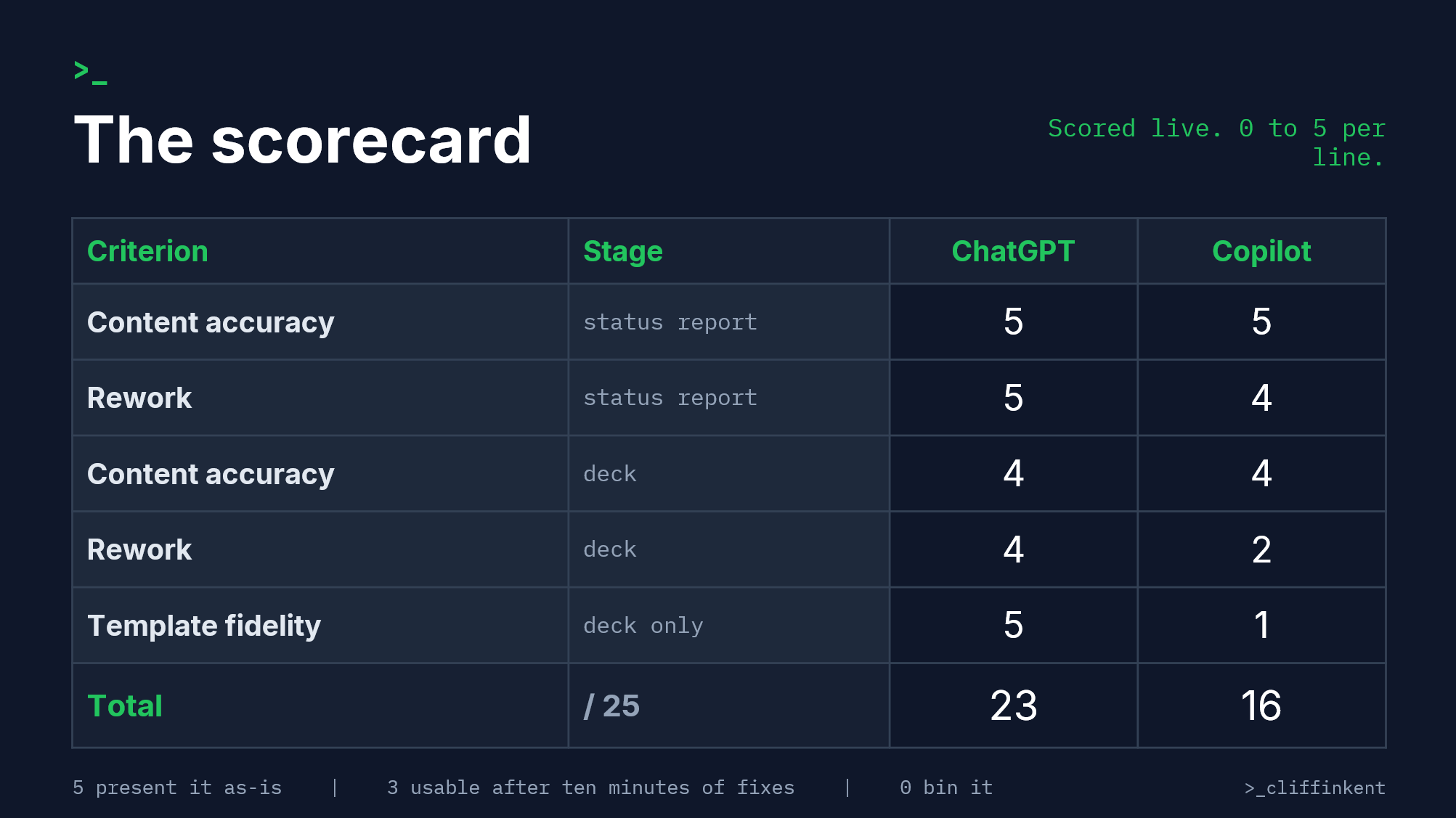
For this workflow, today, use ChatGPT. Final score 23 to 16. It turned ten files of messy project notes into an accurate status report, then edited a locked PowerPoint template in place: same fonts, same tables, native chart updated with the right numbers. Copilot matched it on reading comprehension, then failed to open the template inside PowerPoint at all, and its browser fallback rebuilt the deck from scratch in the wrong font with content nobody wrote.
- ChatGPT's file editing
- Reading comprehension
- Ten seeded accuracy traps
- Co pilots report formatting
- Co Pilot didn't work in Powerpoint
- Co Pilot did not use the provided PPT template
For this workflow, today, I'd use ChatGPT. Final score 23 to 16. It took ten files of messy project notes, wrote a status report that caught every trap I'd planted, then edited my locked PowerPoint template in place: same fonts, same tables, and it updated the native chart with the right numbers. Copilot matched it on reading comprehension, then failed to open the template inside PowerPoint at all, and its browser fallback rebuilt my deck from scratch in the wrong font, with two slides I never designed and my surname on the title page. My surname appears in none of the source files.
One day, one project, one template. That's a first take, and the section at the end covers what would change it.
The test
The job was a real steering committee prep, start to finish. Two chained tasks:
The chain was the point. Each tool carried its own report into the deck stage, so anything wrong early stayed wrong, because that's what happens when you trust output you haven't checked.
The project, Kestrel, is fictional: a 3,800-user document migration built to be as close to real life as I can publish without putting client work on the internet. The mess is authentic. Ten accuracy traps were seeded across the files, including a budget figure stated wrong and corrected four hours later, a stale cutover date in an old document, a disputed RAG resolved two meetings after it was raised, and a hard contract deadline that lives mainly in one email.
Both tools received identical files and this prompt, verbatim: use only the attached sources, resolve conflicts toward the most recent or most authoritative version, flag gaps rather than guessing, ready to send. The full prompt and the complete notes pack are in the download at the end of this page.
- Turn ten files of project mess (a Slack export, meeting minutes, two email chains, a half-finished status doc, my own scribbles) into the period status report you'd send a sponsor.
- Take that report and populate a locked ten-slide committee template: branded, RAG chips as coloured table cells, a native PowerPoint chart on the budget slide.
How I scored it
Three criteria, declared before either tool ran, each 0 to 5:
Content accuracy: everything traceable to the sources. Inventions and omissions both cost points.
Rework: how much fixing before I'd send it. 5 is send as-is, 3 is ten minutes of fixes, 0 is faster to do it myself.
Template fidelity (deck only): did the layout, fonts, tables, chart and branding survive?
Accuracy and rework were scored at both stages, fidelity once, so the deck carries more weight than the report. That matches the job: the deck is what the committee sees.
Round 1: the status reports
Both tools passed all ten traps. Both used the corrected £287k rather than the superseded £275k. Both presented the cutover move as a proposal awaiting committee approval rather than a done deal. Both kept the disputed training workstream at amber and carried the tripwire condition: one more vendor slip and it goes red automatically. Both ignored the noise seeded in the files.
The difference was polish. Copilot's report arrived cluttered with OneDrive citation links and Outlook people cards on nearly every line, had no in-progress section, and never stated the meeting it was for. Five to ten minutes of tidying. ChatGPT's was ready to paste into an email: clean header with the meeting date, full phase-level budget arithmetic, and two actions honestly flagged as "no due date recorded in the source files".
Report scores: ChatGPT 10 (accuracy 5, rework 5), Copilot 9 (accuracy 5, rework 4).
Round 2: the deck
ChatGPT edited the actual file. Ten slides in, ten slides out, same layout, same fonts, placeholders and worked-example rows replaced with real content, every RAG chip the right colour. The budget slide kept its native PowerPoint chart, and the data behind it was updated correctly: the forecast series sums to the £510k forecast at completion. It even computed a number that appears nowhere in any source, 95 days to the next gate, from the dates alone.
Two misses, both the kind that get project managers in trouble. The milestone strip leads with the proposed cutover date rather than the approved baseline; it says "approval requested" underneath, but a committee member skimming the strip reads the new date as fact. And the training tripwire, captured perfectly in the report, vanished from the deck commentary. It survived one summary and died in the second.
Copilot never got to play at home. Copilot inside PowerPoint returned "Something went wrong and I couldn't read the presentation" three times. The fallback, the same prompt and files into browser Copilot, produced something that looks right for about half a second: navy background, the right greens and ambers, my footer on every slide. Then you look closer. Every word is in Microsoft's Aptos Mono rather than my brand fonts. The logo is gone; there are no images in the file at all. The RAG table is text boxes painted to look like a table. The chart was deleted and replaced with stat boxes. The agenda slide was removed, two slides I never designed were invented, and a strapline I never wrote was stamped across every page. The content inside the wrong deck was largely accurate, and it kept the tripwire ChatGPT lost. It also added a project manager name to the title slide that appears in none of the ten files. It took my surname from my Microsoft account and signed my name to a deck I didn't make.
Deck scores: ChatGPT fidelity 5, accuracy 4, rework 4. Copilot fidelity 1, accuracy 4, rework 2.
Final scorecard
The trust check
The name is the finding I'd want every reader to sit with. A tool signed into your work account will helpfully reach into your profile and write things into deliverables that your sources never contained. Here it was a surname. On your project it could be a distribution list, a calendar detail, a colleague's title. Nothing in the output warns you it happened. Check what the AI knew that you didn't tell it.
Who should use which
If your deliverable is a branded template and the content already exists, ChatGPT handled file fidelity better than anything I've tested to date. If your organisation lives in M365 and Copilot's native editing works on your files, that convenience is real; it has worked for me on real work before this test. On this evidence, don't assume it will work on the file that matters on the day it matters.
Who should avoid both: anyone planning to send the output unchecked. Both decks contained a miss that would have misled a steering committee.
Run this test yourself
The scorecard, the exact prompt and the full ten-file notes pack (with the answer key to all ten traps) are free to download from the template page HERE, run it on Claude, Gemini, or whatever your work gives you, and score it before you send anything to anybody important.
Watch the full test: [FILL video link]